Friday, October 28, 2016
JUMP! First Gameplay Video
I'm very excited to share the first JUMP! gameplay video! This shows a couple levels of the game as well as the in-game Level Editor. Please let me know what you think in the comments.
Check out zendopixel.com and LIKE the ZendoPixel Facebook Page for the latest updates and game information. I will need beta testers soon. Liking and Sharing the ZendoPixel Facebook Page or following ZendoPixel on Twitter are great ways to get involved, helping me to spread the word, and getting early beta access to try it out for yourself.
Thanks so much for your help!
facebook.com/zendopixel
twitter.com/zendopixel
zendopixel.com
ZendoPixel Blog
Saturday, March 21, 2015
Marketing Guide for Indie Game Developers
I just recently stumbled upon The Marketing Guide for Game Developers and wanted to share it. There's a LOT of good information in there, spanning the gamut from working on the quality of your game to working with the press, blogging, social media, advertising and so much more. If you're new to marketing like myself, definitely check it out!
Tuesday, March 17, 2015
Introducing ZendoPixelTM

Today is an exciting day for me, because I have the great pleasure of introducing ZendoPixel! ZendoPixel is the new brand and trademark I've created for releasing apps and games on the Android platform. I've secured the website, Facebook, Twitter, and many others on namecheckr to make sure I can truly claim this trademark as my own.
For details about the ZendoPixel brand and my first Android game that I plan to release before June of this year, check out the ZendoPixel Official Website! It features information about my upcoming game, as well as a brand blog and forums where anyone can register to discuss ZendoPixel stuff. I'm still doing some tweaking, like trying to make the forum software look a little nicer, but would love to hear any feedback you might have.
You can also get involved with ZendoPixel on the following social channels:
Facebook: facebook.com/zendopixel
Twitter: twitter.com/zendopixel
Google+: plus.google.com/+ZendoPixelSoftware
Please share, like, reply, comment, tweet, and any other thing-a-ma-jig you can think of to help me spread the word! I'm just one guy trying to start something big for my family, and marketing is not my strength. However, I do believe in a big God who can do anything and blesses me every day. I am grateful for this new opportunity, and for every bit of support.
Tuesday, February 17, 2015
Building My Personal Brand

One of the questions eating at me while preparing to release my Android game is "Do I need to establish a company (LLC) to sell on the Google Play market?" I know you can't trust everything you read on the internet, but this StackExchange post leans toward the negative. I haven't pulled the trigger on creating my Google Play Developer account yet, trying to get some details in order first, but that post indicates there is a "Developer" field where I can simply enter the name I want to use for my brand.
To do that, I thought really long and hard (and did quite a few Google searches) to find an obscure enough brand name that's easy to spell, easy to say, and sounds pretty darn cool. I'm almost too excited and about to blurt it out right now, but I've acquired the big three (website domain, Facebook, Twitter) and am in the process of fully configuring my accounts before a proper introduction. An excellent blog post from Mr. Bestebroer at OrangePixel got me thinking about the importance of building my brand. In addition to some useful marketing tips, he talks about including a little logo with each of your game icons to help players remember your games. It's a little mnemonic so that if they've played and enjoyed one of your games in the past, they are more inclined to try your newer games.
With that in mind, I've spent the past couple days creating my brand logo. I used a free vector-graphics program called Inkscape so I can resize the logo to any size without losing image quality. And I think I have a good plan for using the first character of my logo as the brand on my game icons.
Things are coming together, but I'm really not too good at the whole marketing aspect. I'm sure I have some friends who are way better at this, so if you have any tips or ideas about building your personal brand, or marketing in general, let me know in the comments below!
Monday, February 16, 2015
Code Isn't Everything
I recently saw this Gamasutra blog post by Pascal Bestebroer, titled "My game's done. Now comes the stress, struggles, and adrenaline of a one-man team doing his own PR". And I thought... HOW RELEVANT!
For the longest time I was laser-focused on writing the code for my game. And I would occasionally blog about it. But I didn't give much thought to marketing the game after it was completed. Kudos to Mr. Bestebroer for starting his PR as early as the first week of development! This guy clearly has had more time in the trenches than I.
Marketing is perhaps more important than the coding of a successful game, at least by conventional definition of success. For me, I think just getting my game out on the Google Play store will be a success. But it's good to realize, as I'm learning, that you're not done once the game code is completed. And if you can get a head start on your PR efforts, the earlier the better.
For the longest time I was laser-focused on writing the code for my game. And I would occasionally blog about it. But I didn't give much thought to marketing the game after it was completed. Kudos to Mr. Bestebroer for starting his PR as early as the first week of development! This guy clearly has had more time in the trenches than I.
Marketing is perhaps more important than the coding of a successful game, at least by conventional definition of success. For me, I think just getting my game out on the Google Play store will be a success. But it's good to realize, as I'm learning, that you're not done once the game code is completed. And if you can get a head start on your PR efforts, the earlier the better.
Monday, January 26, 2015
Finishing the Game

Image By: Tim Geers
I've been out of the game development world for about a year. Part of the reason I stopped working on my Android game (code-named PlaneRunner) over a year ago was burnout. It's not easy working a full-time job and staying up til the wee hours working on a side project many nights of the week. We also endured a grueling process selling our home (which took about a year) and moving to a new area, and I think part of me succumbed to the idea that it was time to let my hobby go. Maybe it's not really my passion, or just not worth all the sacrifice.
If only I had realized how close I was to the finish line...
Thankfully, I decided to take a look at that old PlaneRunner project this year. Much to my surprise, it was closer to done than I remembered! I had implemented the ability to save games, the level editor looked beautiful, and when I fired it up on my new Android Kitkat 4.4 phone... it actually worked. So it was time to figure out which features and bugs actually needed to get resolved for me to be happy enough to call it "done". All software developers know a program is never perfect, so it's just about getting it to work the best you can. If you waited until it was perfect, it would NEVER get released.
So the exciting news is that I'm now in the final stages of development. I'm not putting in any new features or bug fixes (unless I find something extremely annoying). This week I'm focusing on performance tuning, doing whatever I can to reduce memory allocation and garbage collection so the game runs smoothly. And this time I'm going to get it out there on Google Play so everyone can play it!
Sunday, January 18, 2015
Picking It Up Again
I used to wonder what happened to game developer blogs. I'd follow someone who updated frequently and then, as if out of nowhere, they'd disappear. Being a little older (and hopefully wiser too), I think I now understand.
For some, a game project consumes so much time that blogging takes a back seat. For others, life just gets in the way. Having kids, moving to a new location, new job, or other life changes just take precedence. I've had quite a few changes myself, hence a year of no updates, neither on my Android game nor on this blog.
But I am excited to share that I've picked up where I left off with the game and was pleasantly surprised to see I'm not far from completion. In fact, I've resolved most bugs, created both a Lite (free) and Deluxe (paid) version, and am working through the process to get my game on the Google Play market. These are exciting days!
Wednesday, November 13, 2013
Are You Willing to Pay???

Image By: SalFalko
How much is TOO MUCH for an Android game? How much is too little?
These questions plague me as a I prepare to release my upcoming game on the Android Market, hopefully within a month or so. I've spent nearly a year and a half, mostly after hours because I have a day job also, developing a rather simple ball-jumping-platform-puzzler... for lack of a better description, and I'm quite proud of it. Heck, it even has an on-device level editor you can use to create your own levels! But it's no Mario. In fact, it's more along the lines of something like Lunar Lander. Will people be willing to pay 99 cents for something I've poured countless hours into? And honestly, it feels a little devaluing (is that a word?) to charge a mere buck for something that's taken so much time, effort, and... sacrifice.
There's always a cost, or many costs, when you pursue something you truly enjoy. And I'm talking about more than just the cost of the man-hours invested in a project! In my case, I can't tell you how many family movie times, story times, or bedtime songs I've missed to "keep plugging away" at some urgent-seeming code. In retrospect, I doubt that any piece of code is ever that urgent.
Also perhaps ironically, I haven't played any games in a long time, which is a very sad fact for someone who used to love first-person shooters and who is also on a journey to become a GAME developer! The truth is, whenever I consider playing a new game, my thought process goes something like "Why should I play another game right now when I could be using this precious little time to work on MY game?"
And let's not forget the cost of lost sleep and late mornings. Feeling dead tired in the morning because you were up until 2 or 3am the night before is a major drain, repeated occurrences of which can (and in my case did) lead to major burnouts. At one point I had to take a couple months hiatus from my personal development to get some rest. That was a tough call for me, but was important to get some sanity back. In the end, taking some time off allowed me to get some distance and come back with fresh perspectives.
All this isn't to say I regret the time I've spent working on the game. Over time, I've established a discipline of only developing a couple nights a week, though they do still tend to be late nights requiring a major shot of caffeine when I wake up. But I think it's good to realize with any passion you pursue, unless you're lucky enough to already do it for a living, that there are many potential costs to consider.
So if you're about to pursue something awesome on your own time, the question remains...
Are you willing to pay?
Oh, and... keep your eyes open for a game called "JUMP!" landing on a market near you very soon :)
Sunday, October 20, 2013
A Complete Android Game Audio Solution
While audible sound effects and music won't necessarily make any video game more fun, they definitely do make it more interesting and more immersive. Before I added any sounds to my new Android game, I didn't really notice they were missing because I was so focused on gameplay elements. But after adding them, whenever I muted my device (or disabled the audio in code for performance troubleshooting) it was obvious... something was missing.

If you want to learn how to code audio for your Android app or game yourself, the Android developer site's Managing Audio Playback and Media Playback pages are a good place to start. There are also some good sites/blogs out there that mention how to play a single sound effect or play a single music file, but I had trouble finding a complete solution that handled sound effects AND music, so I created an audio class that allows you to easily play music and sound effects from any activity. I hope this will help others wanting to get started with audio in their Android apps/games.
My GameAudio.java file and its code are licensed under the Creative Commons Attribution License, meaning you may freely use it and adapt it to your needs as long as you credit me as the original author in a header comment. If you wouldn't mind posting a comment here telling me how you're using it, that would also be really cool and be a good incentive for me to share additional code in the future :)
Download GameAudio.java as a Zip File
View Source of GameAudio.java in a Pop-Up Window
Below is an Activity code snippet showing how to use the GameAudio class. Note the placement of the
Image By: Siddartha Thota
If you want to learn how to code audio for your Android app or game yourself, the Android developer site's Managing Audio Playback and Media Playback pages are a good place to start. There are also some good sites/blogs out there that mention how to play a single sound effect or play a single music file, but I had trouble finding a complete solution that handled sound effects AND music, so I created an audio class that allows you to easily play music and sound effects from any activity. I hope this will help others wanting to get started with audio in their Android apps/games.
My GameAudio.java file and its code are licensed under the Creative Commons Attribution License, meaning you may freely use it and adapt it to your needs as long as you credit me as the original author in a header comment. If you wouldn't mind posting a comment here telling me how you're using it, that would also be really cool and be a good incentive for me to share additional code in the future :)
Download GameAudio.java as a Zip File
View Source of GameAudio.java in a Pop-Up Window
Below is an Activity code snippet showing how to use the GameAudio class. Note the placement of the
initialize and releaseAll calls in onResume and onPause, respectively. The playMusic and playSound methods can be called anytime after intialize and before releaseAll.
...
    @Override
    protected void onResume() {
        super.onResume();
        GameAudio.initialize(this, R.array.MenuSounds);
        GameAudio.playMusic(R.raw.music_title_screen, true, 1.0f);
    }

    @Override
    protected void onPause() {
        super.onPause();
        GameAudio.releaseAll();
    }

    public void onClick(View v) {
        GameAudio.playSound(R.raw.sound_button_press);
...
One final note, you may have noticed the initialize method takes an array resource input parameter -- R.array.MenuSounds in the snippet above. This is done to allow the GameAudio class to create a mapping between sound effect resource identifiers like R.raw.sound_button_press and the handle for the loaded sound created by the SoundPool.load function. If you only want to play music, you can pass null for that array resource identifier. Otherwise, create an entry like the one below in your res/values/arrays.xml file.
So that's it, the complete audio solution I'm using in my upcoming Android game. I hope this helps someone else just like the community's awesome docs, blogs, and websites have helped me.... - @raw/sound_button_press
...
Friday, October 18, 2013
Changing It Up

Image By: GollyGforce
Why change? Because we must. And because it's Fall. And because it's fun to mix things up once in a while. I'm still tweaking a little bit, so you may notice additional changes over the next couple weeks, but I think the white text on black background will be here for a while. Hope you like it, but if not let me know!
Thanks for holding tight while the dust settles...
Saturday, October 12, 2013
Rave Reviews Are IN!!!

Image By: Sarah Reid
The feedback is in, and so far people are LOVING my new Android game!
"Addicting!" - Anonymous Family Member
"I like this game. It's really fun!" - Anonymous Friend
"He can't stop talking about your game, it's all he ever talks about!" - Anonymous Mother
OK, OK, in all fairness these reviews aren't exactly new-ish. And I do mention somewhat tongue-in-cheek that these are anonymous sources because I haven't requested permission to use their names. But these quotes DID happen, and all I can say is that there is quite an amazing rush when someone else picks up something you've poured countless hours into and says "hey, this is pretty fun."
Since the time of those feedbacks I've added sounds, music, and a number of visual (particle) effects to raise the bar. So if it was already fun then... well, I hope it's only getting better!
Wednesday, October 9, 2013
What's YOUR backup strategy?
Recently, I was working on my afore-mentioned forthcoming Android game. I currently use Subversion, coupled with TortoiseSVN, locally on my development laptop for change management. So if I get to a solid point where I'm happy with my changes, I can commit them to my local repository. Then if I later try something new and don't like my latest work I can just revert back to the last "golden" build.
But there is a certain danger in this development flow. As I mentioned, I'm using Subversion locally on my development laptop. And every now and then, I get a sneaking suspicion that my laptop is just waiting to die on me right before I commit a large chunk of code with the most amazing changes I've ever made! So what is a poor indie game developer to do?
In the past, collaborating with a team on a small PC game, my team used a commercial hosting plan. So our code was committed to a remote repository and that worked as our off-site backup. But for my small Android game, I didn't really want to pay for hosting OR use an open-source repository. So I've actually been using the much lower-tech method of zipping up my code folder and storing occasional backups on DropBox or my Google Drive. That gets the job done; I just worry I may not be doing that frequently enough, and like I said the laptop could choose to give up on any given day. One thing I've learned over the years is "Save early, Save often." and to not trust hardware, because it will let you down when you least expect it.
So what's YOUR backup strategy? Leave a comment to let me know! But excuse me... I need to go, uh... make another backup... :)
But there is a certain danger in this development flow. As I mentioned, I'm using Subversion locally on my development laptop. And every now and then, I get a sneaking suspicion that my laptop is just waiting to die on me right before I commit a large chunk of code with the most amazing changes I've ever made! So what is a poor indie game developer to do?
In the past, collaborating with a team on a small PC game, my team used a commercial hosting plan. So our code was committed to a remote repository and that worked as our off-site backup. But for my small Android game, I didn't really want to pay for hosting OR use an open-source repository. So I've actually been using the much lower-tech method of zipping up my code folder and storing occasional backups on DropBox or my Google Drive. That gets the job done; I just worry I may not be doing that frequently enough, and like I said the laptop could choose to give up on any given day. One thing I've learned over the years is "Save early, Save often." and to not trust hardware, because it will let you down when you least expect it.
So what's YOUR backup strategy? Leave a comment to let me know! But excuse me... I need to go, uh... make another backup... :)
Tuesday, June 18, 2013
Android Game Teaser
I've been working off-and-on for nearly a year on my current Android game project, code-named Plane Runner. Although I'm not an artist, I wanted to have a game that I can truly call my own creation. But I must say that even with my minimal "programmer art" skills I am pleased with how it is turning out so far and am hoping to release the game on the Android Market later this year.
I'm keeping the title a secret for now, but below is the main menu background. Let me know what you think!

I'm keeping the title a secret for now, but below is the main menu background. Let me know what you think!

Thursday, May 30, 2013
Geeking Out, Round 2
In my last post I thought I had found the nirvana of blog-to-social-media management. Using IFTTT, a new Tumblr post would be created automagically whenever I created a new blog post. I expected (or maybe just hoped) that Tumblr would in turn automagically create similar Facebook and Twitter posts, but it seems the Facebook and Twitter updates only happen if you post directly on Tumblr.
As a workaround for now, I've created three separate recipes on IFTTT: one to create a post on each of Tumblr, Facebook, and Twitter when I create a new blog post. I'm curious to see if this group works the way I expect.
BUT, and this is a biggie, I just recently learned (thanks Bill!) about a service called HootSuite that can be used to manage multiple social media profiles. LifeHacker also has a list of the five best social media managers. And something even cooler is that there are IFTTT recipes for HootSuite also; so I could accomplish my multi-profile update with a single IFTTT recipe, but I'll play with that another day.
Let's see if this works, pressing the big red button in 3... 2... 1...
As a workaround for now, I've created three separate recipes on IFTTT: one to create a post on each of Tumblr, Facebook, and Twitter when I create a new blog post. I'm curious to see if this group works the way I expect.
BUT, and this is a biggie, I just recently learned (thanks Bill!) about a service called HootSuite that can be used to manage multiple social media profiles. LifeHacker also has a list of the five best social media managers. And something even cooler is that there are IFTTT recipes for HootSuite also; so I could accomplish my multi-profile update with a single IFTTT recipe, but I'll play with that another day.
Let's see if this works, pressing the big red button in 3... 2... 1...
Tuesday, May 28, 2013
Geeking Out: Tumblr + IFTTT
This post is a slight diversion from the usual game-related content. I should probably be working on my Plane Runner game instead of this other geeky stuff :) But I've become more and more interested lately in 1) how to update all of my social networks at once, and 2) how to stay up-to-date with others' content on those networks in one place.

I recently stumbled upon Tumblr and IFTTT (IF This Then That). Tumblr is cool because once you post something there, it can syndicate directly to Facebook and Twitter. IFTTT allows you to create triggers that, when detected, trigger some other action. For example, I'm using the example illustrated above to create a link post on Tumblr when I create a new blog entry here.
If I set this all up correctly, the act of creating this very blog post will cause IFTTT to create a Tumblr link post (linking to this blog entry), which I hope will in turn create similar Facebook and Twitter posts. If that doesn't work, I can probably just create multiple "recipes" on IFTTT to syndicate to all of the networks individually (instead of relying on Tumblr to post to Facebook and Twitter). Regardless, the geek in me is a little too excited about all of this automation updating my multiple online profiles!
How are you using Tumblr, IFTTT, or [insert other cool site here] to update multiple social networks? If you blog, how do you keep all of your followers aware of new entries? What cool tools are you using to read content from Facebook, Twitter, Tumblr, etc.?
I recently stumbled upon Tumblr and IFTTT (IF This Then That). Tumblr is cool because once you post something there, it can syndicate directly to Facebook and Twitter. IFTTT allows you to create triggers that, when detected, trigger some other action. For example, I'm using the example illustrated above to create a link post on Tumblr when I create a new blog entry here.
If I set this all up correctly, the act of creating this very blog post will cause IFTTT to create a Tumblr link post (linking to this blog entry), which I hope will in turn create similar Facebook and Twitter posts. If that doesn't work, I can probably just create multiple "recipes" on IFTTT to syndicate to all of the networks individually (instead of relying on Tumblr to post to Facebook and Twitter). Regardless, the geek in me is a little too excited about all of this automation updating my multiple online profiles!
How are you using Tumblr, IFTTT, or [insert other cool site here] to update multiple social networks? If you blog, how do you keep all of your followers aware of new entries? What cool tools are you using to read content from Facebook, Twitter, Tumblr, etc.?
Sunday, May 26, 2013
Still Ticking
A couple years ago when I started really digging into the gaming scene and trying to get familiar with other game developers by their blogs, I found it odd that so many seemed to disappear or otherwise fall off the face of the earth. A couple years older and wiser, and with some game development experience under my belt, I now know why.
For me, my regularity in posting drops off when I'm busy in a development cycle. The logic goes something like this: Why should I write about my game when I can be developing my game? Why write a blog post when I could be otherwise writing code for the game? Even when my fellow collaborators continued playing a ton of other games, I had trouble playing anything because I couldn't seem to justify spending any spare time NOT writing code for the game I was working on at the time. You see, the problem is balance. Especially as an indie developer where my time was already split between my 40+ hours per week day job and family, precious little development time would often occur after hours (10pm to 2am, sometimes 3am... ish) a couple nights a week. I think I just got burned out a little, and I wouldn't be surprised if that happens to others as well.
But I'm not complaining. I'm thankful for the 2-year experience I had working with some really cool artist friends on a tower defense game. In fact, today I was (finally) able to load it up again and take a look at what we had accomplished. Of course, looking at it now, somewhat removed from when I had written a lot of the code, it was a lot easier to see the imperfections and how un-polished it was. It's very tempting to go back and try to make some of those old game mechanics work better. I've learned a lot about engine design since those days and I wish I could go back and redo the entire design, but I know it would take forever.
In the time since the tower defense game, I took a nice long break to just spend time with my family and unwind a little before diving into some Android development. I was really interested in creating a game people could hold in the palm of their hands. So I created a ball-jumping puzzler tentatively named Plane Runner, and it was an AMAZING feeling to run it on our Kindle Fire. Heck, even the simple Layout Views app that I posted about in my last post over a year ago was a blast to watch running on the Kindle Fire. And when we got a smartphone, it was even more sensational to play Plane Runner on that device. But again I started putting in too much after-hours time on the game, getting burned out again, and had to take another little break.
Whereas the tower defense game taught me a lot about collaboration with artists (and a sound guy!), as well as XNA and a variety of effects processing and creating a 3D game, Plane Runner has taught me a lot about creating a game for mobile devices (mind the garbage collector!) and how to better design a game engine, including but not limited to the use of a Scene Graph, better event management, and a component-based architecture. If you're at all interested in creating games for Android, I highly recommend Chris Pruett's Google I/O talk.
So that's just a little history on what's happened in the time since my last post. But I wanted to let everyone know that I'm still here. I'm still ticking, still developing (though now at a slower pace for the sake of sanity) and hopefully also still writing here from time to time. I am determined to finish Plane Runner, to have at least ONE completed game in my portfolio. But most importantly, I hope to continue growing and learning, and would encourage fellow indies to do the same. I now understand why some seem to have fallen off the face of the earth, but hey... it's never too late to make a comeback, right?
For me, my regularity in posting drops off when I'm busy in a development cycle. The logic goes something like this: Why should I write about my game when I can be developing my game? Why write a blog post when I could be otherwise writing code for the game? Even when my fellow collaborators continued playing a ton of other games, I had trouble playing anything because I couldn't seem to justify spending any spare time NOT writing code for the game I was working on at the time. You see, the problem is balance. Especially as an indie developer where my time was already split between my 40+ hours per week day job and family, precious little development time would often occur after hours (10pm to 2am, sometimes 3am... ish) a couple nights a week. I think I just got burned out a little, and I wouldn't be surprised if that happens to others as well.
But I'm not complaining. I'm thankful for the 2-year experience I had working with some really cool artist friends on a tower defense game. In fact, today I was (finally) able to load it up again and take a look at what we had accomplished. Of course, looking at it now, somewhat removed from when I had written a lot of the code, it was a lot easier to see the imperfections and how un-polished it was. It's very tempting to go back and try to make some of those old game mechanics work better. I've learned a lot about engine design since those days and I wish I could go back and redo the entire design, but I know it would take forever.
In the time since the tower defense game, I took a nice long break to just spend time with my family and unwind a little before diving into some Android development. I was really interested in creating a game people could hold in the palm of their hands. So I created a ball-jumping puzzler tentatively named Plane Runner, and it was an AMAZING feeling to run it on our Kindle Fire. Heck, even the simple Layout Views app that I posted about in my last post over a year ago was a blast to watch running on the Kindle Fire. And when we got a smartphone, it was even more sensational to play Plane Runner on that device. But again I started putting in too much after-hours time on the game, getting burned out again, and had to take another little break.
Whereas the tower defense game taught me a lot about collaboration with artists (and a sound guy!), as well as XNA and a variety of effects processing and creating a 3D game, Plane Runner has taught me a lot about creating a game for mobile devices (mind the garbage collector!) and how to better design a game engine, including but not limited to the use of a Scene Graph, better event management, and a component-based architecture. If you're at all interested in creating games for Android, I highly recommend Chris Pruett's Google I/O talk.
So that's just a little history on what's happened in the time since my last post. But I wanted to let everyone know that I'm still here. I'm still ticking, still developing (though now at a slower pace for the sake of sanity) and hopefully also still writing here from time to time. I am determined to finish Plane Runner, to have at least ONE completed game in my portfolio. But most importantly, I hope to continue growing and learning, and would encourage fellow indies to do the same. I now understand why some seem to have fallen off the face of the earth, but hey... it's never too late to make a comeback, right?
Monday, April 23, 2012
My First Android App - HelloViews
The title of this post may be a misnomer. We all know a programmer's first program in any new language is guaranteed to be "Hello, World" and that was no different for me. So this may actually be my third or fourth app, but it's the first one I've written that does something slightly interesting (at least to developers) and that I can say I'm proud of.
What I did is combined the Hello Views tutorials from the Android developer site into a single app. You can think of it as a "views viewer" that allows you to see some of the possible layouts along with the corresponding code and XML used to create them.
Here's a couple screenshots (using an emulator):
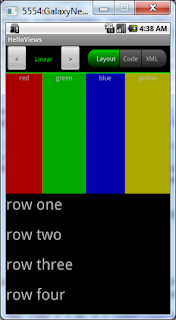
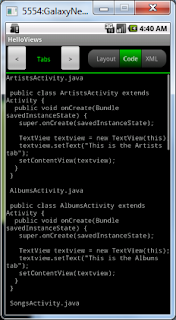
No more ado: Download the APK file now!
If you're stuck on how to install the APK as a program on your Android device, you'll have to do a web search for "side load" and the name of your device. I do have some directions for how to side load an app on the Kindle Fire here.
Please feel free to comment with any thoughts on my first app, especially to let me know if you have any trouble using it on your phone/tablet/Fire/whatever! Also if any developers out there are interested in the source of this app, just let me know and I'll be happy to post it.
What I did is combined the Hello Views tutorials from the Android developer site into a single app. You can think of it as a "views viewer" that allows you to see some of the possible layouts along with the corresponding code and XML used to create them.
Here's a couple screenshots (using an emulator):
No more ado: Download the APK file now!
If you're stuck on how to install the APK as a program on your Android device, you'll have to do a web search for "side load" and the name of your device. I do have some directions for how to side load an app on the Kindle Fire here.
Please feel free to comment with any thoughts on my first app, especially to let me know if you have any trouble using it on your phone/tablet/Fire/whatever! Also if any developers out there are interested in the source of this app, just let me know and I'll be happy to post it.
Friday, April 6, 2012
Hello World on Kindle Fire... YATA!
For anyone not versed in the original Heroes television series, the Japanese time-traveling hero named "Hiro" would exuberantly exclaim "Yata!" when he accomplished something awesome. In the same vein, I'm excited that after only a day I was able to create my first Hello World application and actually run it on my Kindle Fire! Below are the brief steps taken to make it work. This is not a comprehensive guide but includes some gotchas to hopefully help anyone else who might be stuck.
Create a working app that loads in the Android Emulator:
Building your app for distribution:
To get your shiny new app on the Kindle Fire, or any device really, you have to build it in release mode and sign the output APK file. Fortunately this is a relatively easy process from within Eclipse once you have the ADT plugin installed.
Sending your app to the Kindle Fire:
Now comes the fun part!
If you followed ALL of those steps, your new application should be installed on your Kindle Fire and ready to run from the Apps view. YATA!!!
Create a working app that loads in the Android Emulator:
- Install a JDK (Java Development Kit) - I used the Java Platform (JDK) 7u3 available from Oracle here
- Install Eclipse IDE - I grabbed the Eclipse IDE for Java Developers here
- From developer.android.com, download and install Android SDK. This also installs the SDK Manager, which itself is pretty darn cool.
- Follow the SDK installation directions here. One of the things this will guide you through is installing the ADT (Android Developer Tools) plugin for Eclipse, which is used to simplify tasks that would otherwise have to be done manually. For example, it provides nice New Project and Export wizards for creating and distributing your applications. FYI the ADT plugin took a LONG time to install on my system; I let it do its thing overnight.
- If it wasn't done as part of the SDK installation, install the latest platfrom from Android SDK Manager, which can be opened from directly inside Eclipse after the ADT plugin is installed and Eclipse is restarted.
- Follow the Hello World tutorial. This will guide you through setting up an AVD (Android Virtual Device), running your app in the emulator, etc.
- Edit your AVD in Eclipse, setting the Snapshot option to Enabled. This greatly improved the loading speed of the emulator for me.
Building your app for distribution:
To get your shiny new app on the Kindle Fire, or any device really, you have to build it in release mode and sign the output APK file. Fortunately this is a relatively easy process from within Eclipse once you have the ADT plugin installed.
- First you need to make sure to add the JDK bin folder's path to your system's PATH environment variable. If you don't know how to do this you will have to search (as did I) to figure out the correct way to edit the "Path" environment variable on your OS. Once you do this, Eclipse will be able to use the KeyTool and JarSigner SDK tools to build your APK file.
- In Eclipse, click to edit your project's AndroidManifest.xml file. You want to edit the Min SDK version, settings its value to "8" (without quotes). SDK version 8 is the API Level associated with Android version 2.2. The reason for this is that, I believe, the Kindle Fire runs an altered version of Android v2.3; so if you use an SDK version much higher than 8 (e.g. the default for mine was 15), the Kindle Fire won't be able to open the package when you transfer it to the device. I know I'm using the API level for Android v2.2 when I said the Fire is running v2.3 - feel free to experiment with the number, I just know that it definitely works with min API level set to 8.
- Now click the root of the project in the Package Explorer.
- Select File > Export, select the Android option, then select the Export Android Application item and click Next.
- Enter a project name and click Next.
- If this is your first run exporting an app, choose to create a new "keystore". Enter a folder path followed by the name you want for your new keystore (e.g. C:\android\keystores\mykeystore). In the example, the name of the output keystore file will be "mykeystore.keystore" (the extension is .keystore). Also specify a password and click Next.
- Enter some info to identify the key that will be used to sign your APK file; it is highly recommended to set the Validity (number of years the key is valid) to a value greater than 25. Once all required info is entered, click Next.
- Finally, specify the destination for your APK output file and click Finish!
Sending your app to the Kindle Fire:
Now comes the fun part!
- Transfer your new APK output file to the Kindle Fire. You can do this directly using a micro-USB cable to connect your Fire to your computer, or you can email the file to an email address you can check on the Fire. If you send the APK file as an email attachment, you will be able to save it to the Fire's internal Downloads folder.
- Download and install the free ES File Explorer from the Amazon app store.
- In the Fire's settings, select More > Device and then set the option "Allow Installation of Applications From Unknown Sources" to ON.
- Now in ES File Explorer, navigate to the location where you saved the APK file (the Downloads folder if you saved the file from an email attachment).
- In ES File Explorer, click the file and you should be prompted to install the application. Obviously, hit Install to install the application!
If you followed ALL of those steps, your new application should be installed on your Kindle Fire and ready to run from the Apps view. YATA!!!
Thursday, April 5, 2012
On Losing Control...
I'm still contemplating creating an Android game (or even just a quick "Hello, World!" to get my feet wet) to try out on my Kindle Fire. If I get a little more time I might even start that tonight. But a month or so ago I bought the e-book Unreal Development Kit Game Programming with UnrealScript: Beginner's Guide (which yes, I am reading on the Fire) to get a feel for UDK UnrealScript programming. At first, I was thinking it's pretty cool. I mean, you get to learn about some of the classes in UDK and in a matter of minutes you can have an Unreal-style game up and running. What I'm struggling with, however... is what feels like a total loss of control.
With XNA development, where I had to do everything, I could do exactly that: just about anything. Of course, the ability to do anything came at a heavy price: lots of complex or ground-breaking code with minimal assistance from our favorite search engines. I still recall the horror that was getting the simplest model animations to work in XNA 3.1 because of the lack of animation support out-of-the-box. But I digress.
I just have to say, in this as-yet unfamiliar world of UDK UnrealScript programming it feels weird writing script "classes" and not having full control over how things work. But maybe I just haven't learned enough yet. I have only completed about 40% of the book anyway. We'll see where that leads, but for now I start again at the beginning of every programmer's journey.... Hello, World!
With XNA development, where I had to do everything, I could do exactly that: just about anything. Of course, the ability to do anything came at a heavy price: lots of complex or ground-breaking code with minimal assistance from our favorite search engines. I still recall the horror that was getting the simplest model animations to work in XNA 3.1 because of the lack of animation support out-of-the-box. But I digress.
I just have to say, in this as-yet unfamiliar world of UDK UnrealScript programming it feels weird writing script "classes" and not having full control over how things work. But maybe I just haven't learned enough yet. I have only completed about 40% of the book anyway. We'll see where that leads, but for now I start again at the beginning of every programmer's journey.... Hello, World!
Friday, February 10, 2012
Android Mobile Game Development
When I first started this blog, I was most interested in creating PC games using C++ with Direct3D, part of the DirectX suite from Microsoft. After a couple projects on my own, I started working with a team of guys interested in developing for the XBox 360 (and PC) using the C# language and the XNA Game Studio engine/framework. Now that our tower defense game project is winding down, and having recently purchased a Kindle Fire, I'm considering creating an Android game I can play on the Fire.
In the past couple years I've held off on learning an engine in the interest of "knowing how things work under the hood". So I think it's definitely time to learn an engine or two. I'm not sure if Android development is the right path for me, but here's a quick collection of notes based on the article Android Game Elements and Tools to get me started. Hopefully it will help some new Android developers out there too; just be sure to check out the article if you need more detailed instructions on getting things set up.
In the past couple years I've held off on learning an engine in the interest of "knowing how things work under the hood". So I think it's definitely time to learn an engine or two. I'm not sure if Android development is the right path for me, but here's a quick collection of notes based on the article Android Game Elements and Tools to get me started. Hopefully it will help some new Android developers out there too; just be sure to check out the article if you need more detailed instructions on getting things set up.
- Develop Java code in the Eclipse IDE.
- The Java code will run in the Dalvik virtual machine on Android devices.
- Learn the Android SDK at developer.android.com.
- Set up an Android Virtual Device (AVD) to run the program in an emulator.
- Use the AndEngine game engine.
- Use the Java port of the Box2D physics engine. JBox2D is included in AndEngine.
- Use free tools Inkscape and GIMP for graphics.
- Use free tools Audacity and MuseScore for sound effects and music, respectively.
Subscribe to:
Posts (Atom)