Sunday, August 30, 2009

Sine Language Lesson, Part 1

I've had this idea ruminating in my mind for some time now. Math is a big part of graphics development and I'm certainly no expert, but I wanted to show off some cool things that can be done with sine waves. This part introduces the concept and shows some fun demo programs you can play with; part two will delve into the inner workings of the demos, which have been adapted from Frank Luna's Introduction to 3D Game Programming with DirectX 9.0c: A Shader Approach.

You may remember from your high school Trigonometry class (don't worry if not, it was a long time ago for me too!) those two periodic functions, sine (pronounced "sign") and cosine ("co-sign"). They're essentially the same function and you could map one to the other with a slight shift. Cosine has some unique applications of its own, such as determining light intensity based on viewing angle, but the demos below will focus primarily on sine waves.


Notice a few interesting properties from the graph above. One is that a sine wave repeats itself every 2π (π ≈ 3.14159) or 360 degrees along the X-axis. Another is that it oscillates between the Y values -1 and 1. We write the function y = sin(x) to indicate the Y value as a function of X; see from the graph above that Y = 0 when X is any multiple of π and Y is either 1 or -1 (the peaks and valleys) when X is an odd multiple of π/2.

Point Light Demo - Download Program!

This demo shows how sine waves can be used to animate a light source. Use the specified keys to combine waves, creating a variety of unique horizontal and vertical motion paths.

Before learning this elegant method, my approach to animating an object that sways back and forth, or moves repeatedly up and down along a pole, was to use code like this in my update loop:
    static bool moveUp = true;
    if (moveUp) 
    { if (shipPos.y < 100) shipPos.y += value; else moveUp = false; }
    else 
    { if (shipPos.y > -100) shipPos.y -= value; else moveUp = true; }
With sine waves, this code reduces simply to shipPos.y = 100 * sin(x)! Notice that I multiplied by 100 to get the desired range instead of the standard oscillation from -1 to 1.

Ocean Waves Demo - Download Program!

This demo illustrates the effects of adding sine waves and two different wave types, circular and directional. Use the specified keys to play with parameters and change the wave patterns.

As with the Point Light demo, you will need to have DirectX (from Windows Update) installed in order to run the program.

These are just a couple applications of the sine function. Because of its periodic repetition, it could have many potential uses; some fellow GCG forum members cited their implementations of a 3D carousel and a wavy spaceship flight path as additional examples.

I hope you enjoy the demo programs of this post, though I admit I still need to learn better methods of input handling. Part two will describe wave alterations, based on the Ocean Waves demo, in greater detail. Until then, feel free to let us know: What's the coolest thing you've done with sine/cosine waves?
Thursday, July 16, 2009

Quick Random Update

So, Gamasutra is on Twitter too. You may recognize them, or at least you should if you have any business as a video game developer/designer. Gamasutra is one of the most popular game-oriented websites with full-featured articles and commentaries on the state of the industry, game reviews, yadda yadda yadda. So now you can check out not only the website, but also the Twitter feed. Oops, sorry if that last link didn't work; I suppose I should have linked it the proper way: @Gamasutra!

Enough hype, this post is mostly me checking in for a quick progress update. I blasted through reading about lighting, textures, blending, and stenciling in my Direct3D book and then found out the exercises required a fair deal of re-reading. Lesson learned, I have to work through chapter exercises before moving on to more difficult chapters! The same applies to the Game Design Concepts course I'm taking -- it's much easier to keep up with the readings than work through the exercises, some of which I have to skip. FYI, you can follow discussion for the course on Twitter too; just search for #GDCU!

The topic of my next post will be the power of sine waves. Yep, I'm talking about those tricky oscillating waves you learned about way back in high school. I've found some interesting applications and want to show off some of the cool stuff you can do with them. And now that I'm finally understanding the basics of HLSL (High Level Shader Language) shaders, the part that tripped me up big time in the last book I read, you can expect some posts on that stuff too.

Just curious, when was the last time you used something from high school you never thought you would need again? What's the trickiest math you've used in game development, and does calculus ever figure into the equation (pun... fully... intended!)?

Saturday, July 4, 2009

The Problem with the Mythical Black Box

In programming, we occasionally make use of something known as a "black box." This Mythical Black Box is any library or chunk of code written by someone else that allows us to abstract a problem so we don't have to understand the details of solving it. For example, if we pass the values 3 and 4 to a "calculator black box", which might be a class library written by another developer, we would expect it to return the value 12 for multiplication. We don't care how it works internally, whether it computes 3+3+3+3 or 4+4+4; all we care is that it returns the correct value. A black box diagram for an encryption algorithm might look something like the following.

Password => { Encryption Black Box } => Encrypted Password

Jeff Atwood of Coding Horror has recently expressed seemingly contrasting views on this topic, both touting and refuting the benefits of abstraction. And for good reason, because it can be a good thing or a bad thing depending on whose library you choose. For one thing, you should never introduce code into your project if you aren't 100% certain it will fulfill its promise. Many developers (myself included) prefer the "roll your own" method for most tasks simply because you know you can trust your own code (not that it will be error-free, just that it won't be malicious). But sometimes it makes sense to use a well-tested library from another developer, such as the ever-popular JQuery library for Javascript development. In such cases I suggest ensuring you trust the developer (e.g. they're well known, such as Microsoft, and would be ridiculed if the library failed) or that you have full access to the source code. Many open source projects are reviewed by large numbers of people such that bugs are caught and fixed quickly.

Unfortunately, even if you take my suggestions your black box may someday fail. The whole reason I bring this up is that I faced this exact problem with my SkyCop demo. I developed it using the Common Files Framework presented in Engel's Beginning Direct3D Game Programming, 2nd Edition and provided in a specific version of the Microsoft DirectX SDK. When I ugraded to the most recent build of the SDK, my demo suddently stopped working and I started getting reports of others not being able to run it either. I ran into numerous problems trying to get it to work with the latest DirectX SDK and believe the Common Files Framework was removed altogether in the latest version. Having relied too heavily on that framework, I wasn't sure how to resolve the compilation errors and feared I would have to scrap the project altogether.

Fortunately, in his Introduction to 3D Game Programming with DirectX 9.0c: A Shader Approach, Frank Luna fully describes a working game framework instead of glossing over it and providing another black box. I was able to essentially rip out the core of my SkyCop demo, converting it to use the new framework, and am pleased to have an updated demo below that should work on any DirectX 9 (or newer) version, but let me know if you still have any trouble running it.

SkyCop v1.1 Demo Download

Black boxes can be a good thing when they're well-written by a trusted developer, but it's also a good idea to review the code (if possible) and at least have a basic understanding of how it works. In my case, as a learning newbie, I was happy to avoid the initial complexity and that later bit me from behind. One thing to keep in mind, though, is that black boxes come in many shapes and sizes. My black box was a game framework but the concept could also apply to a game engine, a single portion (Renderer, Physics, Sound, etc.) of a game engine, or some other game components I'm not even aware of yet.

Do you know what's going on under the hood of your game framework/engine? What black boxes are you relying on to develop your games?

Tuesday, June 30, 2009

June Monthly Checkup

Yep, another month has come and gone. Sadly I still don't have a finished game, but I do have some cool demos to show off in upcoming posts. I'm up to chapter thirteen (of twenty-two) in Luna's Introduction to 3D Game Programming with DirectX 9.0c: A Shader Approach and am learning a lot, but it takes a while to work through the chapter exercises. I'm also in the process of taking Ian Schreiber's free online game design course. My portfolio website is nearly completed; I just need to find a better host before posting the link here on GDJ.

So it's been yet another busy month of learning and experimenting, all while prepping for our big move to NC in August. After we get settled I plan to join the Triangle IGDA chapter so I can get serious about that whole networking thing.

Monday, June 29, 2009

Speedrunning

The Escapist recently caught my attention with this article on speedrunning. If you're not familiar with the concept, some people spend WAY MORE time trying to master games than you or I do. In fact, they spend countless hours and thousands of lives (digital lives of course) trying to master game levels, determining the most efficient paths to complete a level - or in some cases the entire game - in the shortest time possible. There are plenty of other worthy examples on YouTube; just search for "speed run" after the title of your favorite video game.

Would you have the patience to master this??? I doubt I would.

First Day of Class

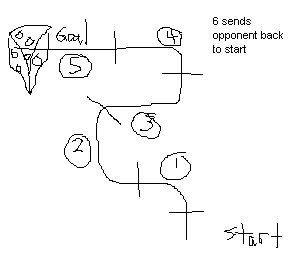
As mentioned some time ago, Ian Schreiber's Game Design Concepts course began today and I personally believe it's off to a great start. I love reading things that make me think in a new way or help me understand concepts with simple examples. For example, have you ever played a game called "three to fifteen"? I had never heard of it and bet most of you haven't either, but once you read that first lesson you'll realize you've probably played it many times!

I know this image is far below par in terms of graphical work typically posted on this blog, but it's actually a very rudimentary game design I created in a matter of two minutes! Ian describes how simple it can be to create a game, and honestly anyone can do it. I call my game "Rat Race", with the concept being that two rat tokens are placed at the start and their goal is to be the first to get to the cheese. Each player must roll the die and get the numbers in order to advance (e.g. roll a 1 to advance to place "1", then roll a 2 to advance to "2", etc.) sequentially all the way from space "1" to the goal at "5". If a player rolls a "6" they send their opponent back to the start position but also forfeit their turn. They do not advance if they roll a number out of turn (e.g. roll anything other than a 1 from the start position).

As Ian points out, mine isn't necessarily a good game, but it proves anyone can do it and I look forward to learning more about designing good games.

Monday, June 22, 2009

Game Development Process

I read the article How a Game Gets Made in the free online edition of Game Career Guide magazine some time ago. It's quite a good read for anyone interested in the process, and I believe it's important for me as a programmer to understand what role I will someday fill as a game developer. What follows is a transcription of notes I took while reading to summarize the process; note that not all possible roles are covered and the steps are not listed in sequential order.

  • Preproduction
    This is the phase where core game design decisions are made, game elements are prototyped, and the game story is developed. A basic prototype of the game is developed quickly and shown to the producer who either scraps the game or gives it the go-ahead to move into production.
    • Designers document objects, characters, levels, enemies, NPCs, etc. for the game
    • Artists work on character designs, level concept art, and storyboarding
    • Programmers work on tools, document technical specs, and perform risk assessment
    • Producer determines a production schedule and milestones

  • Production
    This is the phase where the game is fully developed based on preproduction planning and detailed design documents. Some experimentation is allowed as long as it improves the game. The development team follows a "production methodology" to keep track of and divvy up remaining work.
    • Must determine dependencies early to complete child tasks sooner and keep teams independent (max efficiency)
    • Artists get a head start creating/texturing character models and world props (cars, buildings, crates, etc.)
    • Animators generate animations for character models
    • Programmers work on core functionality and data manipulation
    • Level designers create rough sketches of all levels in the game
    • System designer plugs in characters and tweaks animations and gameplay
    • Sound designers work on effects, getting voice actors for character dialog, and music tracks
    • Team meets periodically to review overall progress of the game
    • At 2/3 of production timeline additional staff is brought in for QA testing; most features are implemented so it's time to squash bugs

  • Postproduction
    Postproduction is all about getting the game into the hands of consumers.
    • Final build of the game (the Gold Master Disc) is printed
    • Marketing publicizes the game to popular game websites, magazines, and as TV ads
    • Publisher handles game manual and box manufacturing, and has a distributor set up to deliver the game to retail stores
    • Developers may be tasked with creating donwloadable content (characters, costumes, levels, etc.) to update and extend the game